Free and open source
Know whether a data file is safe to use.
Drop in a spreadsheet or CSV. Get a plain answer in seconds, and the rows that are wrong.
Works on a single file. Runs on your computer. Nothing is uploaded.
Illustration: a sheet of spreadsheet cells is scanned from top to bottom. The cells with something wrong, such as a row that is a copy of the one above, two impossible ages and two dates in the future, lift out of the sheet and turn red or amber. The rest turn green. The verdict for the file reads: Problems found, 3 problems · 4 warnings · 2 clean columns in sample_customers.csv.
What you get back
An answer, the reasons, and the rows.
Not a report to study. One line, a short list, and the rows.
1
A verdict
Can you use the file? One line tells you.
2
The reasons
What is wrong, where, and how many rows. Worst first.
3
The rows to send back
Download the affected rows, with a message ready to send.
One file is enough
No earlier version needed.
Most files arrive once. It checks a file on its own. Comparing with an earlier one is a bonus, not a requirement.
The first time
Checked on its own.
Duplicates, impossible values, broken dates, mixed spellings.
If it comes again (optional)
Compared with the last one.
Save a good file once. The next one is checked against it.
What it finds
It catches what you would not spot by scrolling.
Each card shows the sentence it writes.
Duplicate rows
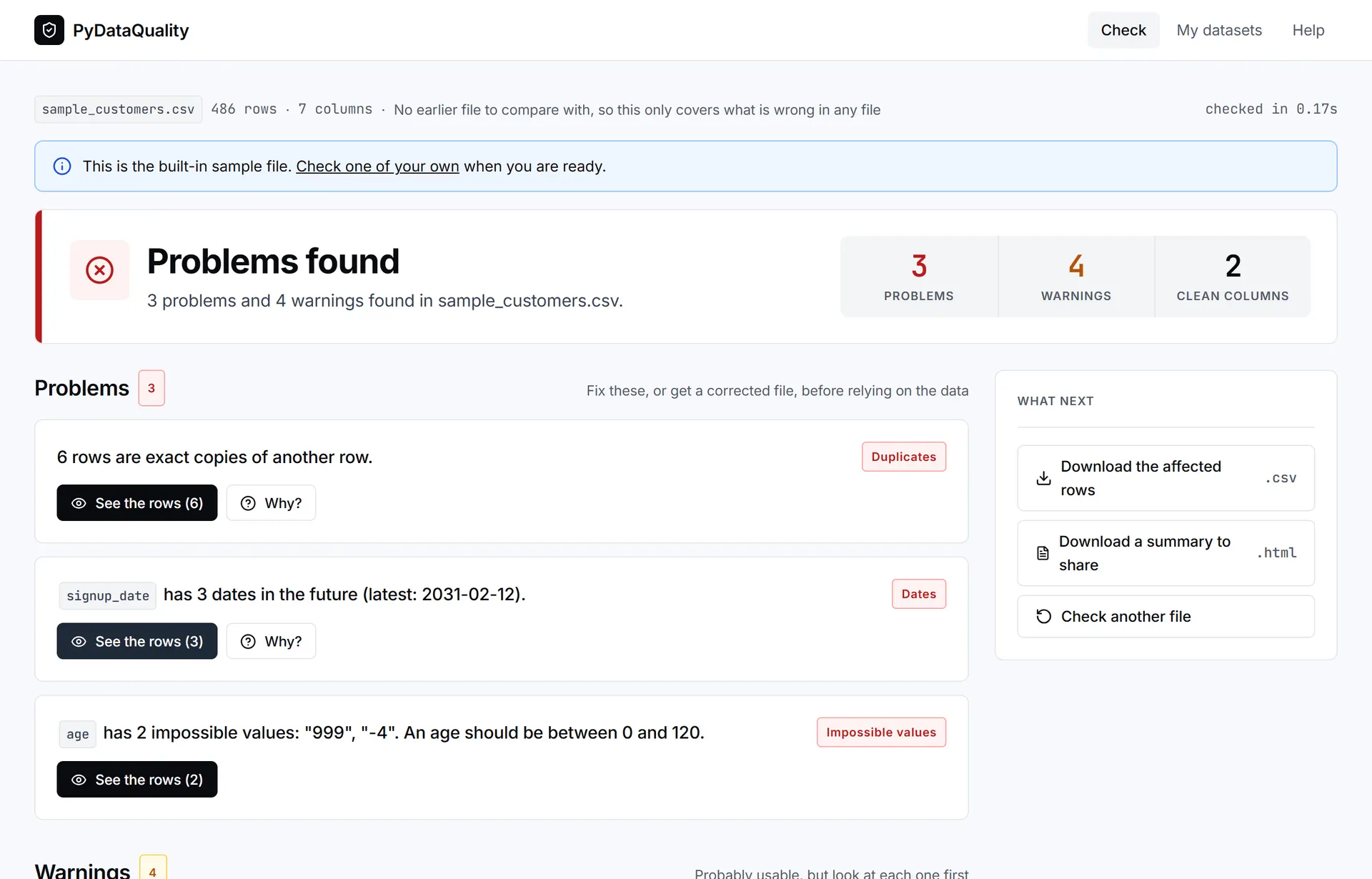
6 rows are exact copies of another row.
IDs that repeat
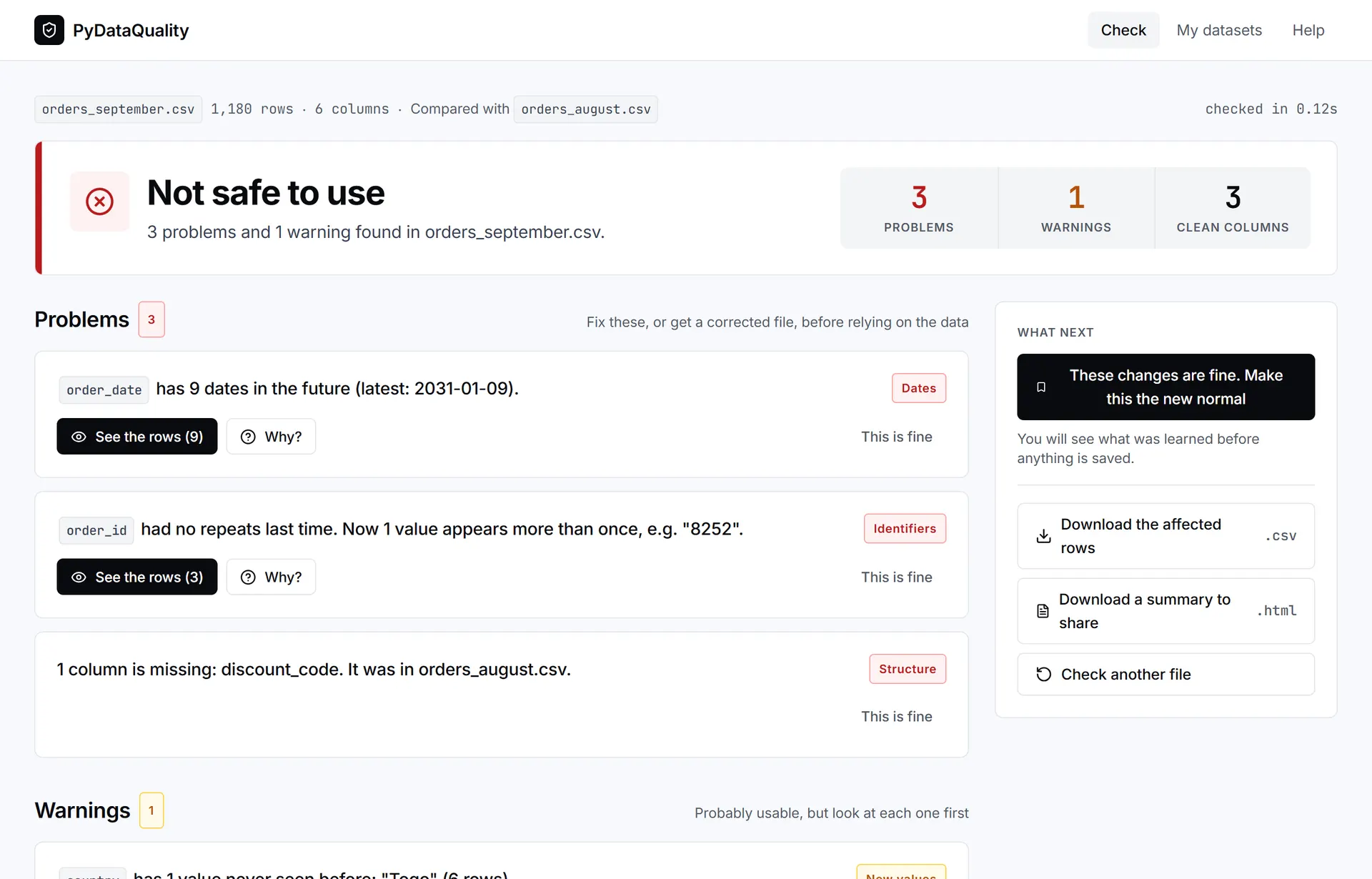
order_id should be unique, but 2 values appear more than once.
Dates in the future
signup_date has 3 dates in the future (latest: 2031-02-12).
A column that went missing
1 column is missing: discount_code. It was in orders_september.csv.
One value spelled three ways
country has 3 spellings of the same value: "Nigeria", "nigeria ", "NIGERIA".
Numbers stored as text
amount is mostly numbers, but 1 value is not: "TBC".
Impossible values
age has 2 impossible values: "999", "-4". An age should be between 0 and 120.
Far fewer rows than last time
The file has 1,200 rows. Last time it had 3,000 (60% fewer).
The app
See it on a real file.
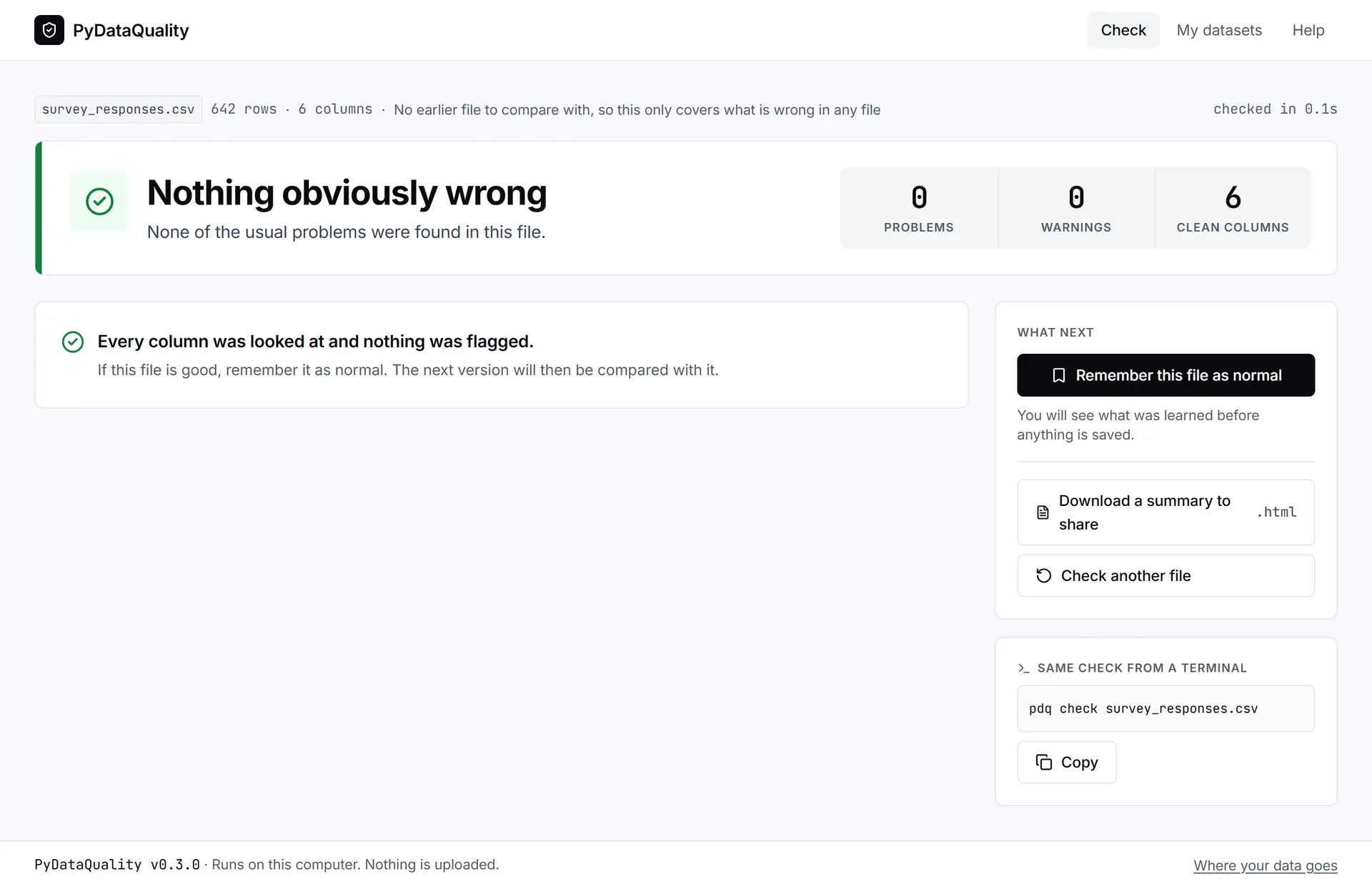
Real screenshots, checking the sample file. Run pdq ui to open it.
The answer comes first.
The verdict, then each finding in one sentence.
Plain language
Sentences you can act on, or forward.
No jargon. No statistics unless you ask.
Dates in the future
What a tool usually prints: future_dates: 15
What PyDataQuality writes: order_datehas 15 dates in the future (latest: 2031-01-01).
Repeated IDs
What a tool usually prints: is_unique: False
What PyDataQuality writes: order_idshould be unique, but 2 values appear more than once.
A column went missing
What a tool usually prints: KeyError: 'discount_code'
What PyDataQuality writes: 1 column is missing: discount_code. It was in orders_september.csv.
Impossible values
What a tool usually prints: outliers outside [-8.00, 96.00]
What PyDataQuality writes: agehas 2 impossible values: "999", "-4". An age should be between 0 and 120.
What you do
Three steps. A fourth if the file comes again.
A button in the app, or a command.
Check
Drop a file in. Get a verdict.
pdq check orders.csv
Act
Get the bad rows, with reasons.
pdq rows orders.csv
Share
One page to send back.
pdq report orders.csv
Remember (optional)
If it comes again, it is compared.
pdq accept orders.csv
How it works
No AI. Five plain steps.
Fixed rules, run on your computer. Ask “Why?” on any finding to see how it was decided.
Reads the file
CSV, Excel, JSON or Parquet, on your computer.
Works out each column
ID, date, email, number, category or text.
Runs the checks that fit
A future signup_date is a problem. A future due_date is not.
Compares, if you saved an earlier file
Missing columns, new values, far fewer rows, shifted numbers.
Writes the answer
One sentence per finding. The worst one sets the verdict.
What it remembers
# PyDataQuality baseline: what a normal file looks like.
name: customers
learned_from: customers.csv
rows: 486
columns:
  customer_id: {kind: id, type: numbers, unique: true}
  email: {kind: email, type: text, unique: true}
  country:
    kind: category
    values: [Ghana, Kenya, NIGERIA, Nigeria, South Africa, nigeria]
A small text file you can read and edit. It describes your columns. It does not hold your rows.
Where your file goes
- Served from 127.0.0.1, your own computer.
- No network requests, no account, no tracking.
- Your file is deleted once it has been read.
Why it matters
Find it before your reader does.
Bad files are usually caught late, by someone else.
56%
of data practitioners name poor data quality as a top problem in their work.
dbt Labs, State of Analytics Engineering 2025With PyDataQuality
Checking becomes one step.
Drop the file in. Nothing to set up, no rules to write.
74%
of data teams say business stakeholders find data issues first.
Monte Carlo and Wakefield Research, 2023With PyDataQuality
You see it first.
The verdict comes before you build anything on the file.
15,841
COVID-19 cases were left out of England's daily count when a file hit a spreadsheet row limit.
Public Health England, October 2020With PyDataQuality
It can remember the last file.
Save a good file once. Far fewer rows next time, or a missing column, gets flagged.
Get started
Download it. Double-click. Done.
Free, for Windows and Mac.
Windows 10 or 11. Mac with Apple Silicon (M1 or newer). All downloads.
Download
One file, about 26 MB. No Python, no terminal.
Run it
It installs for you only. No administrator password.
Drop a file in
PyDataQuality opens in your browser. Your file stays on your computer.
Your computer will ask if you are sure
The app is new and not yet signed. On Windows, choose More info, then Run anyway. On a Mac, confirm it in System Settings, Privacy & Security.
Already use Python?
Install it with pip, then run pdq ui.
Three ways to use it
Use it the way you already work.
The same checks and the same answer, whichever you choose.
No terminal needed.
- Drag and drop a file
- See the rows behind any finding
- Review what was learned before saving
- A history of every kind of file you check
$ pdq ui

An app opens in your browser.
Drop a file on it to check it.
It is served from your own computer
and loads nothing from the internet.
Who it is for
People who are sent files and have to trust them.
- Anyone handed a spreadsheet they have to trust
- Analysts with an export to report on
- Finance and operations staff with supplier or bank files
- Researchers with survey downloads
What it is not
One job. Clear limits.
- It does not fix or edit your file.
- It does not use AI.
- It does not run on a server.
- It does not read files larger than memory.
- It cannot tell that a believable value is wrong.
Yes. It checks a single file on its own. Comparing with an earlier file is optional.
Check the file you trust least.
Download it, open it and drop the file in.
Free · Reads CSV, Excel and JSON · MIT licence